
UAN will be generated by the Employers went the employee joins the EPFO organization for the very first time. UAN can be generated directly even without the employer’s help by following the below process
Generate UAN Number Online
- Go to https://unifiedportal-mem.epfindia.gov.in/memberinterface/
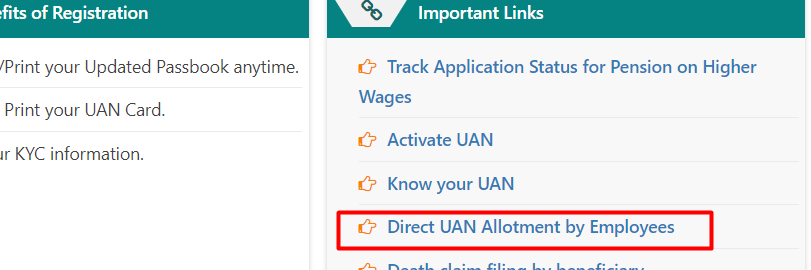
- Click on the link “Direct Allotment UAN” by Employees as shown in the below image
- Enter the mobile number linked with your Aadhaar as shown below
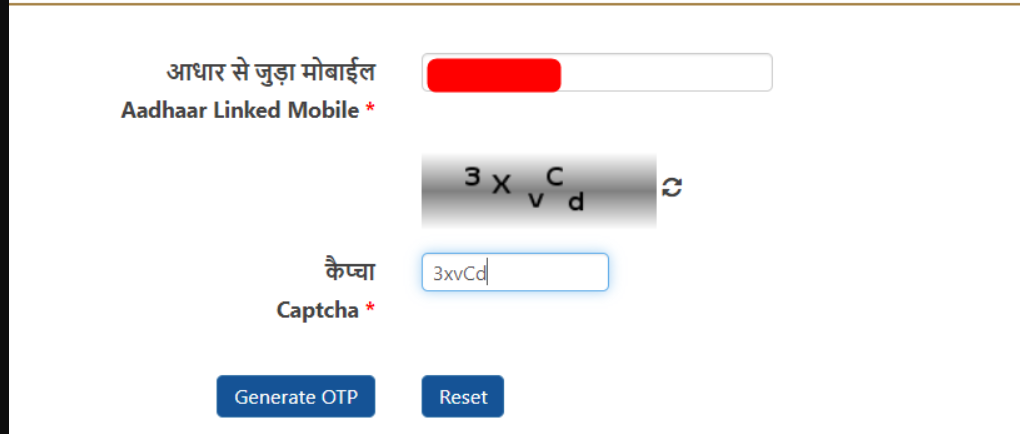

- Once you click on “Generate OTP”, An OTP is generated & sent to your Aadhaar-linked mobile number
- To confirm the identity of your Mobile number, enter the OTP received
- Once the mobile number is validated, EPFO will create a new UAN along with a password & the UAN/Password will be sent to your Aadhaar-linked mobile number
- Then the generated UAN can be submitted to the employer when you join a new job for the first time
Multiple UAN numbers
You are not allowed to have multiple UAN numbers and if you have multiple UAN numbers you can try to merge those UAN numbers into a single UAN by transferring the amount into a single UAN. (Incase you already have an UAN number don’t follow the above process for generating a new UAN)

Shan is an expert on on Employees Provident Fund, Personal Finance, Law and Travel. He has over 8+ years of experience in writing about Personal Finance and anything that resonates with ordinary citizens. His posts are backed by extensive research on the topics backed by solid proofs